8.5.1
🐞 Fixes
- Zoom: Fixed issues with zoom & centering the map on cursor pointer on zoom
If you use world.svg map with Region labels, and you want to update their positions, you need to reload your SVG file: Map Editor / Settings / File / Reload (keep current titles)
Check out these improvements in the video below:
This update is focused on improving the support for Custom Post Types. Finally, we've added the ability to edit the CPT location in the Classic WordPress Post Editor (previously, it was only available in the Gutenberg editor). Also, we've fixed the button that lets you choosing a map in the Classic Editor.
Besides that, we've added even more tools that help us to improve the support experience. Now the issues can be resolved much faster!
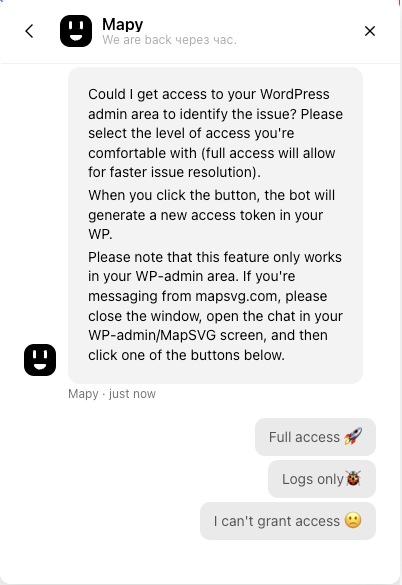
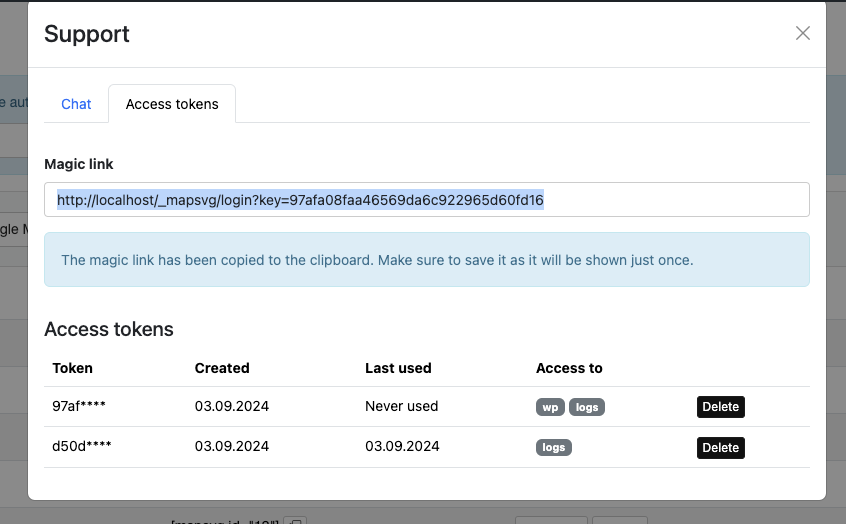
Our goal with this update was to improve the support experience. Now you can easily grant access to your WordPress-admin or WordPress-logs right from the chat application! If we need to check something in your WordPress, we will ask you to grant us access by pressing a button in the chat conversation. When you press the button, the chatbot will generate an access token in your WordPress and copy the magic link to the clipboard. All you need to do is to paste the link in the chat!
Also, we have made it possible to generate multiple access tokens, with different access levels. Now every ticket can have its own access token, which can be easily deleted when issue is resolved.
This update contains long-awaited feature: custom API data sources support! Now you can fetch data from any custom API, format it using the new middleware feature, and load it to the map!
Also, we added a new type of JavaScript functions that you can edit in the "JavaScript" tab: Middlewares. Those are functions that accept some data and context, format the data, and pass it further to the next recepient. There are 4 types of middleware in mapsvg:
In our blog, we've released a tutorial on using a custom API data source and middleware.